One request hub
Collect requests, documents, messages and status updates in a controlled portal.


We build custom high-performance websites & apps with 24/7 support.
Create a secure customer portal where requests, updates, files, approvals and reporting live in one organized experience.
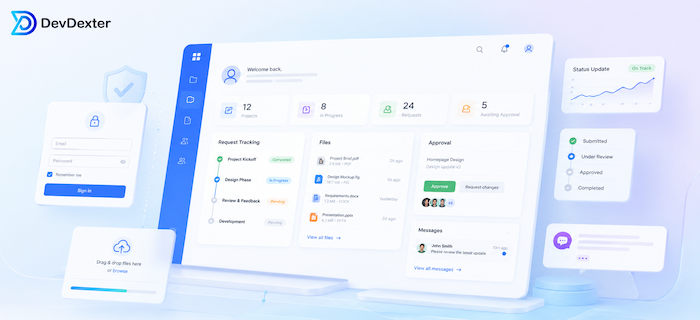
Service businesses often lose time because requests, files, approvals and updates are split between email, chat, spreadsheets and shared folders. DevDexter builds custom portals that make customer work easier to track and easier to deliver.
Collect requests, documents, messages and status updates in a controlled portal.
Let clients see progress, history and next actions without repeated follow-up emails.
Connect portal actions to internal dashboards, notifications and approval workflows.
A client portal is useful when service delivery depends on repeated requests, documents, approvals, updates and follow-ups. Instead of leaving the client experience spread across email and chat, the portal gives both sides one structured place to work.
DevDexter builds portals as part of practical web application development and custom application projects, so the front-end client experience can connect to the internal workflow your team actually uses.
The goal is not just to add a login area. A useful client portal improves communication, service transparency, request tracking and retention by making delivery feel more organized.
A client portal can be scoped around the actions clients and staff need most often, then expanded as the service process becomes clearer.
Controlled access for each client, account, project or user role.
Structured forms that collect the right details before work starts.
Status timelines, ownership, due dates and next steps.
Organized uploads, downloads, document records and access rules.
Review flows, approval actions, comments and activity history.
Email or system alerts for new requests, updates and pending actions.
Progress, reports, open items and account visibility.
Internal queues, workload, alerts and service reporting.
Collect briefs, share deliverables, manage approvals and keep project updates visible.
Share case updates, documents, approvals and client communication history.
Manage recurring requests, reports, action items and client deliverables.
Collect documents, track submissions and share reporting updates securely.
Track service requests, appointments, status updates and completion reports.
Give customers one place for support, reporting, files and follow-up actions.
A strong portal should not be a separate front-end page that creates more admin work. It should connect to the internal team workflow so a client request can become a staff task, approval, notification, dashboard item or report entry.
Document client journeys, request types and internal responsibilities.
Choose the first portal features, roles and reporting needs.
Create a clear portal experience for clients and staff.
Develop secure portal modules, dashboards and integrations.
Launch, gather feedback and extend the portal based on usage.
Client portal cost depends on the number of user roles, request types, document workflows, notifications and integrations. The clearest starting point is the client journey that creates the most repeated admin work today.
Clients, staff, managers and admins may need different permissions and views.
Different request forms, statuses and rules add planning and development scope.
Uploads, storage rules, approvals and access control affect complexity.
Email or system alerts must match the real service workflow.
Client and staff dashboards need clear metric and status logic.
Important client actions should work comfortably on smaller screens.
We build portals around how your team receives, delivers and closes client work.
The portal is planned so clients can understand status and take action quickly.
Portal activity can feed staff dashboards, approvals, notifications and reporting.
A focused first release can later support mobile extensions through mobile app development when needed.
Tell us what clients need to request, upload, approve or track, and we will help shape the portal scope.
A first version usually includes secure login, request forms, status tracking, files, messages, notifications and selected reports.
No. Any service business with recurring client communication, approvals, files or status updates can benefit from a focused portal.
Yes. A responsive web portal can work well on mobile, and a mobile app extension can be planned if the use case needs it.
Yes. Client requests and actions can feed internal dashboards, task queues, reports and notifications.
It reduces scattered communication, gives clients clearer visibility, keeps records organized and helps teams manage delivery steps more consistently.
Yes. File upload, document review and approval workflows can be included with suitable access rules and activity history.
Yes. When requests, status updates, files and approvals are centralized, teams usually spend less time repeating information across email threads.
We will help organize the portal scope, features and next practical step.
Stay updated with DevDexter news, offers, and tech insights.
Web & App Development for the World.
© 2026 DevDexter | All Rights Reserved